Sunday, April 7, 2019
Our Finished Film Opening
My partner and I have finally finished our film opening that we have worked so hard on for the past few months! The link to it is located down below! Hope you enjoy it! 😁

Saturday, April 6, 2019
Editing My CCR and Reflecting Back on my Work
I have finally finished the script to my CCR (Creative Critical reflection)! Located down below is the beginning part of my script.


When I was creating the script for my CCR, I had to do a lot of thinking and retracing of the steps I took in order to create the final product for my film opening project. The first thing I did when I had my script ready was record my voice because I knew that I was going to create a video displaying images/video clips of the things I was talking about. Moreover, I did work on editing this project on the editing tool known as iMovie, and I took videos and images from my work as well as other very well-known work (and of course I gave credit from where the video clips/images were from). So in the end, my final CCR project came out to be at 7 minutes and 46 seconds, which is more that the recommended 5 minutes; however, I really put in my maximum effort to making sure I covered everything so if I were to shorten it I would have deleted essential information. Anyways, I will be posting my CCR tomorrow!
Looking back at these past fews months of creating our film opening, I have realized just how much I was able to learn. Before starting this project, I did not know much on the creative process behind film making or the huge amount of editing that goes into the making of the film. Now, I have really learned to appreciate the film industry and acknowledge all the hard work that goes into making films.
Located below is my final script for my CCR!


Looking back at these past fews months of creating our film opening, I have realized just how much I was able to learn. Before starting this project, I did not know much on the creative process behind film making or the huge amount of editing that goes into the making of the film. Now, I have really learned to appreciate the film industry and acknowledge all the hard work that goes into making films.
Located below is my final script for my CCR!


Sunday, March 31, 2019
Recording/Editing our Film Opening
Starting at the very beginning of our editing journey for our film opening, my partner and I decided on using a different angle than the one we agreed on previously in the storyboard. In the blogpost in which we included the storyboard, we had agreed on using an establishing shot to portray Lucy's living room, in which she would be viewing the news broadcast. However, we thought that for the very first shot of our film opening we should start with a more visually appealing shot. Therefore, we ended up using another shot as our first shot, and this shot was an extreme close-up of the remote control, with the main focus on the remote control and not on the rest of the background. The use of this shot did not only make a more visually appealing first shot, but it helped the viewers get a sense of what was to occur in the next scene. Located below is the first shot we decided on using.
As for the sound portion of our editing process, we first focused on getting all the right sound effects that are shown on screen. For example, the sound effects for the on-screen sounds of iPhone texting, iPhone SMS messages receiving/sending, iPhone receiving call [Marimba ringtone], and the shower turning on. Moreover, in order to get the 5 sound effects instead of going online to search for royalty free sound effects, my partner and I decided to record the audio of ourselves doing those actions that produce the sound effect we needed. For example, I turned on the shower while my partner recorded the sound of the shower turning on. Another example is when I texting on my iPhone and my partner recorded the sounds that the texting produced. Thus, we put these sound effects where they belongs in our film opening. So, the iPhone texting and iPhone SMS messages receiving/sending all belonged in the fake text message conversation scene. The sound of the shower turning on belonged in the last scene along with the sound of an iPhone receiving call [Marimba ringtone].
Another noticeable change with our storyboard and the actual clips that we got when we filmed on Wednesday is that we did not use many of the tracking shots we had initially planned on using. Instead, my partner and I ended up using a combination of shots that consisted of Lucy walking to certain points in the area we were filming. The reason we did not use the tracking shots is because we were getting our footage handheld; therefore, it would have been nearly impossible to get professional-looking tracking shots. However, there was a time in which we did use a tracking shot, and this was the bathroom scene where Lucy goes to turn on the shower and her cell phone rings so the camera followed Lucy into the bathroom to turn on the shower and it also moved with Lucy to pick up her cell phone. Located below is the tracking shot that I previously described.
As for the editing of our film opening, in which we utilized iMovie for because of how familiar it is to us, there were there were three major elements to this very long process:
- Making sure all of the clips flowed and were continuous
- Getting the text messages to appear on screen
- Getting the right sound effects and background music
So to start off, our first task in editing was getting all of the video clips we had recorded on Wednesday in the order in which we wanted them and making sure that the flow was continuous with the action happening on-screen. For example, when Lucy was walking and sitting down in between shots, we had to make sure that the two sequential shots were continuous. Located below is an example from our film opening. Furthermore, once we had reached the bathroom scene we did not have to worry that much on the continuity in between shots due to the fact that we used a tracking shot. However, we did have include a cut when Lucy opened her eyes because of the fact that we had to use a snapchat red colored contacts filter to record our last scene showing Lucy's possession, and during this cut we had to make sure it was hardly noticeable that there were two separate clips making up the one action of Lucy looking upwards.
Now moving on to one of the most tedious parts in our editing journey: getting the text messages to appear on-screen. So when we filmed this video clip, we made sure to utilize the rule of thirds to leave a large space on the far right side of the screen where the text messages would be placed. Moreover, this use of the rule of thirds to position our main character was very useful when we had to position the text messages on-screen. Moving on to the actual editing part, my partner and I had initially decided on using a template for a text message script on the editing application After Effects to display the text messages on-screen; however, once my parter signed up for the free trial and we opened up the editing application to try and get started working on our text messages, we realized that this process using After Effects was way to complicated for us to actually produce a visually appealing text message, on-screen chat. Of course, my partner and I looked up various YouTube video to guide us along the way in this complicated journey using After Effects; however, we finally decided that there had to be another way to get the text messages to appear on-screen. Thus, my partner and I brainstormed different ideas and among these was the one we ended up using. It consisted of us using an app to create a fake group chat conversation. Then, we saved that conversation as a screen recording in our camera roll and layered it on top of the footage of Lucy texting, and we would put it in the space in the far right corner. Moreover, when we actually created the fake conversation in the fake group chat, the application we utilized also let us add pictures for the contacts and name the group chat (which we named "Girliess" with emojis in the end). Located below is the scene fake group chat conversation we created along with the pictures with put for each contact.
 |
| Maria Prieto as Tiffany |
 |
| Rebekah Rotman as Sydney |
 |
| Malena Diez as Taylor |
My partner and I also thought about detaching the audio from the news broadcast and placing it in our film opening just to make the sound more clear; however, we decided on keeping the sound the way it is because the sense of space regarding the sound produced by the television would be lost if we were to detach the audio and just place it in. Thus, we didn't change the anything with regards to sound for the clips where we recorded Lucy watching the news broadcast.
Later on when my partner and I were rewatching our film opening after thinking we had finished, we knew it was missing something. Thus, this is where we took it upon ourselves to add suspenseful background music. Moreover, we tried looking on websites that showed suspenseful background music; however, none of them really convinced me and my partner. Therefore, we then decided to look on iMovie to see if they had any good suspenseful background music, and to our surprise they did! We ended up adding the music named "Drone Dark Suspense 1" as our background music.
In the process of spicing up our film opening with background music, we decided that we needed to find a sound effect that made the clip where Lucy becomes possessed look very intense and give the viewers goosebumps when they watch it. Thus, we went on the website https://www.soundsnap.com and found the perfect sound effect named "Creepy Transitions (152)" to give our film opening ending more dimension as well as a suspenseful aspect.
Finally, when my partner and I added our movie title, "The Call", we had the sound effect from the last scene where Lucy becomes possessed come into it for the slightest second, but one aspect that I would like to point out is that we continued the sound effect of the shower on purpose. We did this to keep the viewers wondering what happened to Lucy and how she never got to take her shower.
Thursday, March 28, 2019
Finalizing Our Main Character's Appearance

As for the makeup and hair portion of her appearance in these scenes of our film opening, we went for the natural, subtle look that we mentioned in previous blog posts. Furthermore, the components of our actress's makeup for the first scenes of our opening we utilized mascara, a touch of bronzer and blush, and a subtle lipgloss. As for her hair, we kept it in it's natural state, which is her straight hair.

In the image above is the palette that my partner and I utilized to achieve our possessed makeup look
for Lucy when she answers her cell phone and ends up suffering the deadly consequences. Moreover, the palette is the James Charles makeup palette, and we only used the black and burgundy shade from the makeup palette.


So, we first started by placing the burgundy shade from the James Charles makeup Palette (which is also shown in the images above) in the under eye region just to create a red undertone to go under the black that we were soon going to be placing there. This, burgundy under her eye also gave the effect of looking as if she was bruised, ultimately adding to the possessed look.


In the video above, you can take notice of the process that my partner and I did with creating the veins underneath our actress's eyes to really execute the possessed look we were going for. We used a black, liquid eyeliner to recreate the look of veins under the eyes.
Moving on, in order to take this possessed makeup look to the next level my partner and I had planned on using intense, red colored contacts that my partner was going to get in Miami, but she ended up just ordering them online through Amazon; however, Amazon had unfortunately damaged our order, which meant that we weren't getting the red colored contacts we had ordered.

This problem really hit us hard because we now had to find another way to make our main character, Lucy, really look as if she had become possessed. Therefore, my partner came up with the genius idea of using a snapchat filter to mimic the look of red colored contacts, which would successfully ended up taking our makeup look to the next level by making it look like Lucy really had become possessed. Located below is the video clip that my partner and I ended up using in our film opening for the very last scene.
Coming Up with our Movie Title
We have been thinking about our film title and we have been researching names of scary movies and we have found a constant pattern that most horror movies share. This pattern is having one or two words as the movie title; therefore, making them short and to the point. Some examples are "It", "Us", "Get Out", "The Nun", "Sinister", "Insidious", etc. Thus, since our film opening is based on mass-suicides caused by individuals picking up their phones to receive a call, we came up with the film title "The Call".
My partner and I found a very useful website that helped us come down to two fonts for our film title. The link to the website is the following: https://www.font-generator.com/.


My partner and I found a very useful website that helped us come down to two fonts for our film title. The link to the website is the following: https://www.font-generator.com/.

The image above is the first option that we have for our film title for our film opening. Moreover, the difference between this font option and the option below is the unique characteristic with the letter "T", and the fact that all the letters are the same size and capitol (except for the letter "h"). Furthermore, my parter and I really like this one mainly because of the distinctness it has due to the unique letter "T". Thus, this would essentially be helpful in helping viewers distinguish our film with others.

The image above is the second option we have in mind for our film title. Moreover, with this film title there are certain elements that catch our attention as well. For example, we like the inspiration it draws from extremely successful films such as The Conjuring and The Nun because it proves to us that these fonts do indeed work with the general target audience of those individuals in the horror genre group. Thus, by giving them a font that they are able to associate with an already popular film, they are able to create high expectations for our film when they watch it. Furthermore, we also liked the combination of several sizes utilized when creating the font as well as the use of all capitol letters because it adds to the creepy/disturbing vibes, which are transmitted through the film opening that basically set up the tone of the whole film.
In the end, my partner and I decided on using the second option mainly because of the close resemblance it had with the movie font of already successful horror movies such as The Conjuring and because of the unusual and eerie vibes it gives off. Thus, we went a step further to customize the font that we selected. This can be seen in the below image.

In the image above you are able to notice two main things: the black background change and the red text color change. So, we ended up changing the white background to black so that it would blend in with the black screen of the ending scene of our film opening immediately following the close up of Lucy's now red-colored eyes. Furthermore, we also changed the white font color to a red font color because it matches the previous scene showing Lucy's eyes change colors dramatically from a calm, blue color to an intense, red one. Also, the reasoning behind using a red font for our film title is because of the fact that the color red can be associated with death and blood; thus, the use of the color red in our title that appears right after the close-up of Lucy's red eyes helps lead viewers to the idea that Lucy suffered the deadly consequence of answering her phone, which was death of course. Also, the red that we used is not a bright red, but instead it is a deep, blood-like, intense red. Thus, this helps capture the terrifying and disturbing horror genre vibes that our film opening is all about.
Tuesday, March 26, 2019
Editing and Filming our News Broadcast
Moving on, we used the edge of my partner's glass, dining table as our desk for the news broadcast, which gave us a more modern look to go with the idea that the problem is occurring present-day. Also, we forgot to ask our teacher for a tripod so we ended up making a tripod of our own with the help of many textbooks. On the table, my partner and I decided to include two identical mugs, two pieces of paper with identical information on it, and two of the same type of blue pens. All these elements were, of course, placed side-by-side of the table to mimic the layout of real news broadcasts.
As for the appearance that my partner and I took on, we decided on letting on hair down for the news broadcast due to the fact that it was not very common for female news anchors to have their hair tied up. Moreover, we both decided to wear blazers with a formal top underneath to capture the professional vibes of female news anchors. As for the makeup of our look, we decided to use a dark pink lipstick instead of a red lipstick.
In the raw footage above, as you can tell it was a little difficult getting the lines right for the both of us. However, the use of a teleprompter helped us tremendously in getting our lines right. We also ran into a few situations where my partner and I had some trouble staying serious to get our lines right, but in the end we ultimately were able to succeed in maintaining a serious tone when we talked about the problem of phones causing mass suicides. Furthermore, when me and my partner messed up our lines, by accident of course, we kept going because we knew that we could edit it later to make it seem as if it was one continuous shot.
We ended up using the editing application iMovie to edit the News broadcast because it is the ones we are most familiar with, and we made use of the different news broadcast layouts they have to take our news broadcast to the next level with making it look legit. Moreover, we accomplished making the cuts look as continuous as possible. Ultimately we were able to finish our news broadcast with the addition of both the clip of me running through the mall and the image/clip of the empty grocery store shelves.
Sunday, March 24, 2019
Editing Chaotic Scenes for the News Broadcast
Located below are some of the video clips that my partner and I took when we went to the mall last week to get the chaotic running scenes showing how many individuals were taking this problem very seriously. We utilized handheld camera movement to capture the chaotic vibes we wanted to achieve in creating this video clip. There were several videos that we were able to get; however, we finally decided on the following three:
The second video located above is one of the best candidates compared with the first and third videos due to the fact that it has just the right amount of shaky camera movement, giving it that chaotic vibe. Thus, the first video located above has way too much shaking going on, which ultimately doesn't let the viewers actually see what is going on in the video clip inserted in the news broadcast. Thus, this is why we ruled this video out of our final cut. Moreover, the third video didn't make the cut due to the fact that it was extremely noticeable that there were not many people in the video clip. Therefore, my partner and I came to terms with utilizing the second video as the video insert in the news broadcast for our film opening.
Now that we have decided on which video to use for our news broadcast, we want to give the video a more "home-made" look. Thus, I found this app called "Camcorder" to give the video a more retro look. The reason behind this is mainly to make the video clip seem more believable and convincing. Therefore, below is the end result of editing this video clip on the "Camcorder" app.
Filming Setback
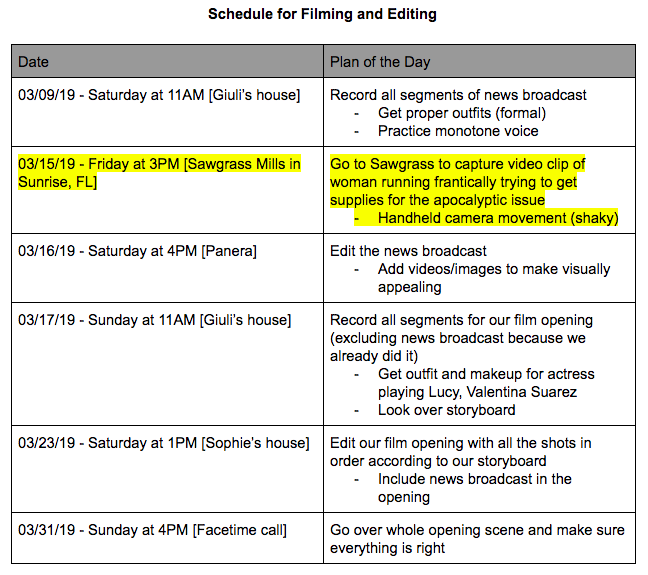
My partner and I were going to follow the schedule that we previously made; however, over the last couple of weeks, both have us have been extremely busy with regards to school work, taking the SAT, all of our extra-curricular activities, and our jobs. Thus, we composed a new schedule to follow tightly during spring break that will consist of filming both parts of our film opening: the news broadcast and our actual film opening. Located below is our new filming schedule that works for both me and my partner as well as Valentina Suarez, our main actress.


Ending Scene makeup
The ending scene of our film opening consists of the possession-like occurrence of when Lucy picks up her phone and something causes her to fall under want to kill herself. Thus, in order to represent this my partner and I had already planned on drawing inspiration from a popular TV series known as The Vampire Diaries.
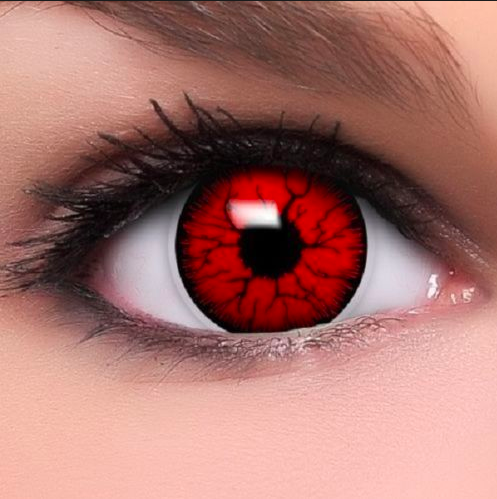
The way we plan on drawing inspiration from The Vampire Diaries is in the way that the directors portray the vampires in the show. Through the use of makeup to create fake veins and contacts to create a change in state of mind, the vampires are represented as non-human-like creatures. In the below image is what my partner and I will mimic in the ending scene of our film opening to portray Lucy becoming possessed and suffering the consequence of answering her cell phone, which of course is killing herself.

Getting the contacts:


Getting the makeup look:
The way we plan on drawing inspiration from The Vampire Diaries is in the way that the directors portray the vampires in the show. Through the use of makeup to create fake veins and contacts to create a change in state of mind, the vampires are represented as non-human-like creatures. In the below image is what my partner and I will mimic in the ending scene of our film opening to portray Lucy becoming possessed and suffering the consequence of answering her cell phone, which of course is killing herself.
Getting the contacts:
- My partner will be going to Miami this Wednesday (03/27/2019) to get the colored contacts from Halloween store called The House of Costumes that sells a range of colored contacts
- We were originally going to order the colored contacts off of an online website; however we realized that it would have taken too long to arrive in order to fulfill our new filming schedule that will be explained in a later post
- She will be specifically be looking for red colored contacts like the ones below
Getting the makeup look:
- For the makeup look we plan on using a combination of eyeliner and black eyeshadow to mimic the picture located above
- The black will mostly be focused around her eyes as can be seen in our inspiration photo
- The use of red blush on Lucy’s cheeks will also be utilized to give her face more color
- We will not be using a dark lipstick like the one in our inspiration image; we won’t be doing anything to the lips other than leave the lip gloss
Main Character Outfit/Makeup
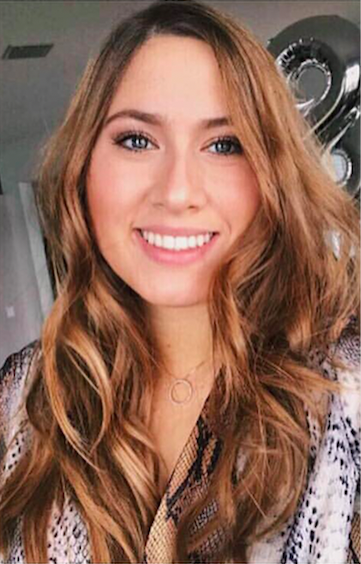
To further expand on the inspiration that we drew from actually developing our main character, Lucy, there was one character that we drew most of our inspiration from. This character is the popular white girl, Regina George, in the infamous film Mean Girls (2004). Below is an image of Regina George.
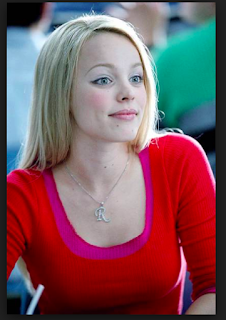
In the Mean Girls film, this character is known for her sassy and ignorant personality. She is also well-recognized in the film as the “queen-bee” of her group of other teenage girls as well. Thus, we took inspiration from her character in developing Lucy’s character as one of the “popular girls” at her high school with a sassy and ignorant personality just like Regina George’s personality. However, we do plan on disregarding any comedic aspects to Regina’s personality.
- Makeup
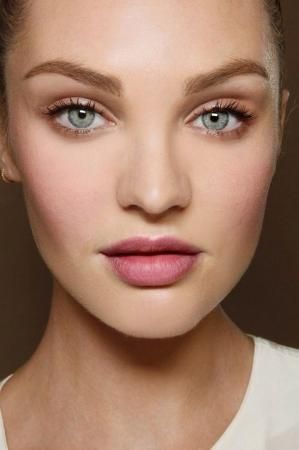
- For the makeup of Lucy Thomas we plan on doing a natural look that includes elements such as eyeshadow, mascara, and lipgloss. We plan on doing a look similar to the below image.
- Outfit
- For the outfit we plan on doing something similar to the below picture that includes elements such as a skirt, solid color undershirt, and a small jacket to put on top of the outfit.
- The image below is our inspiration photo.

- Hair
- Lucy’s hair will consist of a natural look with Valentina’s straight blonde hair, like the below image.

Sunday, March 17, 2019
Text Messages Script
Located below is our script for the online conversation that our main character, Lucy, is going to be having once she finishes watching the news broadcast. Moreover, in this text message conversation that my partner and I created, we made sure to include the modern-day slang of teenagers. For example, words such as "wack" that translate to "crazy" and phrases such as "tbh" that mean "to be honest". Also, the use of all capitol letters helps put emphasis on certain words such as when Tiffany states "ANSWWWER SIS" because Sydney was not active in the chat. Therefore, this leads viewers to wonder what could have happened to Sydney. Thus, by using this language, we capture the age group that Lucy and her friends are a part of. Furthermore, the group chat consists of four young girls: Lucy, Sydney, Taylor, and Tiffany.


Getting Footage for our News Broadcast
On March 15, 2019 (Friday) my partner and I went to Sawgrass Mills Mall to get the footage for a scene in our film opening when we show the news broadcast that our main character, Lucy, would be watching. In this part of the news broadcast it shows a video of just how desperate and worried some individuals are getting due to the situation regarding people killing themselves because they picked up the phone.
Moving on, my partner and I went to the mall and got some of the handheld, shaky shots I explained in a previous blog post. Here is a vlog consisting of a brief explanation on what we did during our trip to the mall:
Change of Plans
In a previous post, I mentioned that my partner and I have decided to utilize shot-reverse-shot with the messages our main character would be receiving from her phone throughout our film opening; however, after a class discussion last week, my partner and I have reconsidered the idea of having the text messages show up on screen next to Lucy when she receives them.
The class discussion consisted of groups of 5 students coming together and explaining their advancement with their film opening project. Moreover, one of the students in my group wasn’t convinced that the use of shot-reverse-shot to show the text messages was the best way to go. Thus, she made the suggestion that my partner and I make use of text messages that appear on screen, and I told her that my partner and I had been trying to decide on that the week before. I also told her that we decided to use shot-reverse-shot just because of how much more practical it was compared with making the text messages show up on screen. However, she told me about an editing tool named “Adobe Premiere Pro” that she had used once before and that she remembers there were ways to mimic the screen of a phone of the video clip itself. She also told us about the 30-day free trial and brought up some of the same points that I mentioned before in a previous blog post on the benefits of using texts that appear on the screen. Some of these benefits include the following:
- One can see the facial expressions of the character on screen
- It is visually/artistically pleasing
- It showcases my team’s capabilities in editing
^^More benefits can be seen in this video made by Tony Zhou^^
As a result from the group discussion I explained before, my partner and I decided on having text messages that appear on screen next to Lucy in our film opening and having the shot-reverse-shot of actually showing the phone as our “plan B” or backup plan if we have trouble with the editing required in the first option of displaying the texts. Thus, we will be doing the 30-day free trial for “Adobe Premiere Pro” and we will be playing around with the all the editing tools it has. We will update any advances or setbacks we have in a future post.
Sunday, March 10, 2019
New Addition to our Schedule
The new addition to our schedule is the highlighted portion of the schedule. Again, we decided to film this video clip on a Friday because of the fact that Sawgrass mills is generally full on the weekend; therefore, we could get the best video clip, consisting of many individuals, to portray the chaotic atmosphere. The detailed explanation of what we would be doing to capture this video clip is located in the blog post titled, “Further Development for our New Broadcast”.
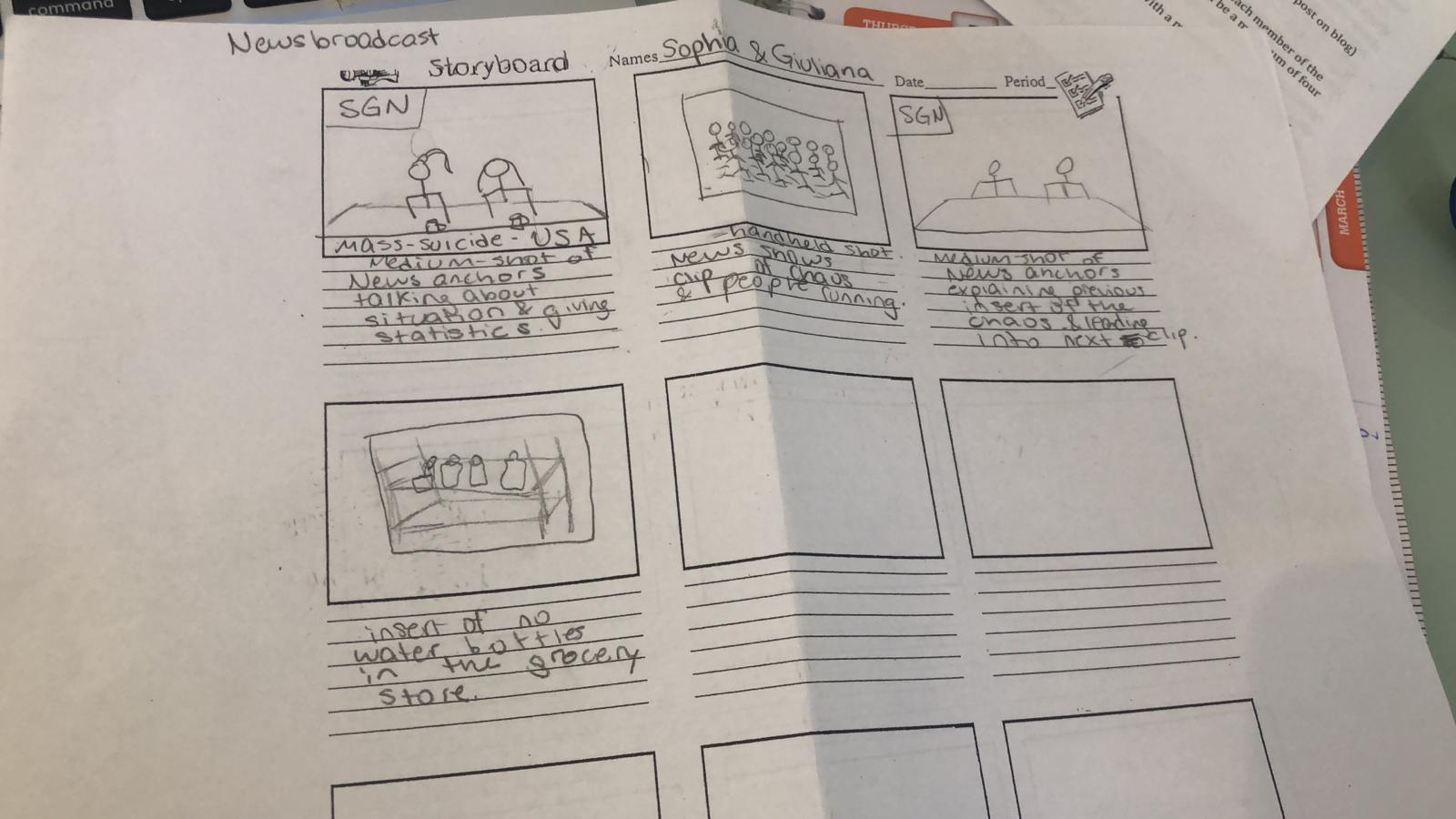
Storyboard for our News Broadcast
Located below is the storyboard for the news broadcast that will be included in our film opening. Here, one is able to take notice of the order in which we will be presenting the video clip of the woman running through the mall and image of the empty grocery isles. This storyboard is still up for change just in case we run into problems when editing/filming. Thus, any changes will be noted in a future post.
Designing Scene for New Broadcast (News Anchors Scene)
In order to design the scene of when the news anchors, which will be me and my partner, speak about the main conflict occurring during our film opening, we went online to find inspiration for our desired set up.
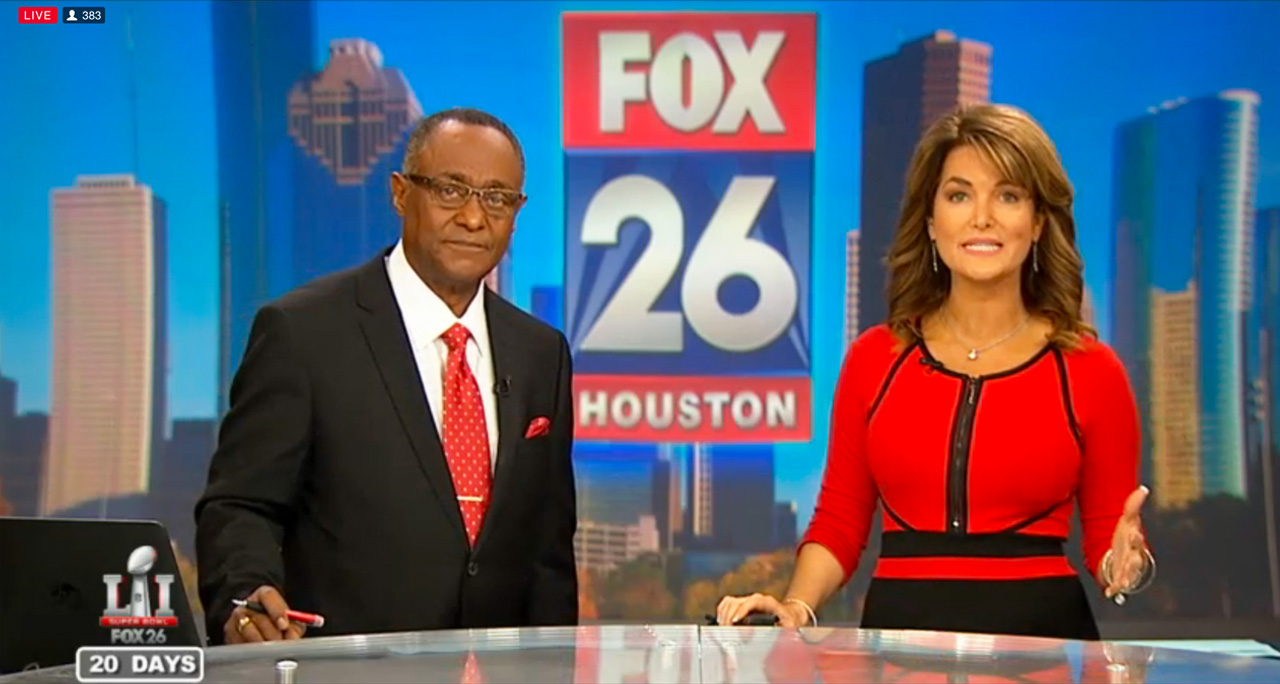
My partner and I were able to find the image above while searching for a good set up that we could realistically manage to achieve. So, we decided that the image above was the perfect inspiration for us, and basically what we are going to do is get a desk/ table to be the bottom portion of the image and find a way to replicate the background using our own logo, of course. In order to replicate the background, I have an idea that I think could work. So, the first part of this idea is designing our logo on a either Piktochart or Canva (This logo will be revealed in a later post). Then, we would set up the desk for our scene in front of a neutral colored wall, and we would essentially be utilizing a projector (which I can get from a family friend) to display our logo on the wall behind us. Thus, this would create a professional atmosphere and help me and my partner capture the look of a real news broadcast to insert in our film opening.
My partner and I were able to find the image above while searching for a good set up that we could realistically manage to achieve. So, we decided that the image above was the perfect inspiration for us, and basically what we are going to do is get a desk/ table to be the bottom portion of the image and find a way to replicate the background using our own logo, of course. In order to replicate the background, I have an idea that I think could work. So, the first part of this idea is designing our logo on a either Piktochart or Canva (This logo will be revealed in a later post). Then, we would set up the desk for our scene in front of a neutral colored wall, and we would essentially be utilizing a projector (which I can get from a family friend) to display our logo on the wall behind us. Thus, this would create a professional atmosphere and help me and my partner capture the look of a real news broadcast to insert in our film opening.
As for the lighting of this portion for the news broadcast, we plan on using the three point lighting technique. Specifically, we plan on using lighting as can be seen in the image below, with key lighting directly in front of the news anchors (me and my partner), fill lighting coming from the sides focusing on us, and back lighting coming from directly behind us.

Finally, my partner and I must consider the physical appearance for the news anchors. One element of this is the outfits, which must be business-like and serious. Thus, my outfit will be a black, fitted blazer with a white undershirt and straight-leg trouser pants. My outfit will also be complemented by certain accessories to contribute to the formal, elegant look. Thus, these accessories consist of the following: glasses, earrings, a necklace, a watch, and silver bracelets.
As for the makeup and hair, my partner and I plan on doing a slicked-back ponytail in each of our hair and neutral makeup (with one of us in a red lipstick) to contribute to the formal look of the news broadcast.
Finally, my partner and I must consider the physical appearance for the news anchors. One element of this is the outfits, which must be business-like and serious. Thus, my outfit will be a black, fitted blazer with a white undershirt and straight-leg trouser pants. My outfit will also be complemented by certain accessories to contribute to the formal, elegant look. Thus, these accessories consist of the following: glasses, earrings, a necklace, a watch, and silver bracelets.
As for the makeup and hair, my partner and I plan on doing a slicked-back ponytail in each of our hair and neutral makeup (with one of us in a red lipstick) to contribute to the formal look of the news broadcast.
Further Development for News Broadcast
We already have an idea of the layout for our new broadcast in the sense of when the anchors would be speaking and when any clips/images would be presented. Thus, now we have to find a way to represent chaos through the clips/images that my partner and I would essentially be creating. So, we have settled on two ideas that we created to successfully capture the atmosphere of chaos in the video clips/images we would include in our news report.
The first idea that we came up with is a video clip consisting of what looks to be like a woman running through a crowded mall, with people that all have the same intentions as her in wanting to buy as much as she can in order to prepare for the worse. Furthermore, we would capture this description for the video clip by having one of us, me or Sophia, run through the mall with a cell phone pointed straight ahead, recording everything. Thus, by having one of us run while we film, we would be utilizing handheld camera movement, which would produce a shaky video clip, which is exactly what we are going for. Moreover, the shaky camera movement will help conceal the fact that the people in the mall were actually walking calmly and make it look like they were part of the chaos portrayed in the video clip. In addition, my partner and I have considered adding sound effects to this video clip just to add to the chaotic atmosphere. Furthermore, we are looking into screaming sound effects; however, we are not sure whether or not the screaming sound effects would make the video clip extremely chaotic because my partner and I must keep in mind that in our film opening the main character, Lucy, is not very concerned about the issue at hand. Moreover, we might just use the sounds from the actual video clip we record at the mall. Our decision on the use of sound effects in one of our video clips for our news broadcast will be noted in a later post.
For the first idea of running through the mall to capture a chaotic video clip, my partner and I plan on going to Sawgrass Mills mall in Sunrise, FL on March 15, 2019 to get this video for our news broadcast. Moreover, this new addition has been updated in our schedule.
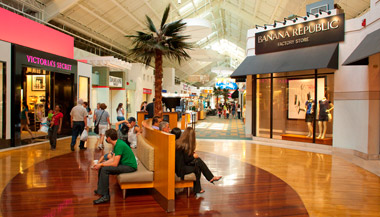
The image above is what Sawgrass Mills looks like from the inside, so this is where we would be getting our video clip. Moreover, we plan on going to Sawgrass on March 15 (Friday) due to the fact that it will most probably be full because the weekends tend to be the days in which the greatest amount of individuals go. Thus, we could get the maximum effect in depicting a chaotic atmosphere.
The second idea we came up with consists of presenting images of our local grocery store, Publix, with empty isles where water bottles are supposed to be. Moreover, these images would actually be from when Hurricane Irma hit Florida, and they would come from my partner, who was the one who took these pictures when she went to Publix during the times in which people were preparing for Hurricane Irma. Furthermore, the images would add to the chaos occurring in the United States regarding the apocalyptic issue going on during our film opening.

The image above shows the idea we are trying to capture, of course we would use my partner’s own images that she took herself when she went to Publix during Hurricane Irma. We would also take inspiration from the headline and try to create something similar with our own special touches.
As for the order in which we will be presenting the video clip and images, we plan on inserting the video clip first and then switching back to the news anchors to explain the previous clip as well as lead in to the next image of the empty grocery isles. This layout will also be seen in a future blog post, which will include the storyboard for our news broadcast.
For the first idea of running through the mall to capture a chaotic video clip, my partner and I plan on going to Sawgrass Mills mall in Sunrise, FL on March 15, 2019 to get this video for our news broadcast. Moreover, this new addition has been updated in our schedule.
The image above is what Sawgrass Mills looks like from the inside, so this is where we would be getting our video clip. Moreover, we plan on going to Sawgrass on March 15 (Friday) due to the fact that it will most probably be full because the weekends tend to be the days in which the greatest amount of individuals go. Thus, we could get the maximum effect in depicting a chaotic atmosphere.
The second idea we came up with consists of presenting images of our local grocery store, Publix, with empty isles where water bottles are supposed to be. Moreover, these images would actually be from when Hurricane Irma hit Florida, and they would come from my partner, who was the one who took these pictures when she went to Publix during the times in which people were preparing for Hurricane Irma. Furthermore, the images would add to the chaos occurring in the United States regarding the apocalyptic issue going on during our film opening.
The image above shows the idea we are trying to capture, of course we would use my partner’s own images that she took herself when she went to Publix during Hurricane Irma. We would also take inspiration from the headline and try to create something similar with our own special touches.
As for the order in which we will be presenting the video clip and images, we plan on inserting the video clip first and then switching back to the news anchors to explain the previous clip as well as lead in to the next image of the empty grocery isles. This layout will also be seen in a future blog post, which will include the storyboard for our news broadcast.
Sunday, March 3, 2019
Our Filming/Editing Schedule
Located below is our schedule for filming and editing both for our film opening. Moreover, this schedule is still able to change depending on my and my partner's personal schedules. Any changes will be noted in a future blog post.

Subscribe to:
Posts (Atom)