
Sunday, March 17, 2019
Text Messages Script
Located below is our script for the online conversation that our main character, Lucy, is going to be having once she finishes watching the news broadcast. Moreover, in this text message conversation that my partner and I created, we made sure to include the modern-day slang of teenagers. For example, words such as "wack" that translate to "crazy" and phrases such as "tbh" that mean "to be honest". Also, the use of all capitol letters helps put emphasis on certain words such as when Tiffany states "ANSWWWER SIS" because Sydney was not active in the chat. Therefore, this leads viewers to wonder what could have happened to Sydney. Thus, by using this language, we capture the age group that Lucy and her friends are a part of. Furthermore, the group chat consists of four young girls: Lucy, Sydney, Taylor, and Tiffany.


Getting Footage for our News Broadcast
On March 15, 2019 (Friday) my partner and I went to Sawgrass Mills Mall to get the footage for a scene in our film opening when we show the news broadcast that our main character, Lucy, would be watching. In this part of the news broadcast it shows a video of just how desperate and worried some individuals are getting due to the situation regarding people killing themselves because they picked up the phone.
Moving on, my partner and I went to the mall and got some of the handheld, shaky shots I explained in a previous blog post. Here is a vlog consisting of a brief explanation on what we did during our trip to the mall:
Change of Plans
In a previous post, I mentioned that my partner and I have decided to utilize shot-reverse-shot with the messages our main character would be receiving from her phone throughout our film opening; however, after a class discussion last week, my partner and I have reconsidered the idea of having the text messages show up on screen next to Lucy when she receives them.
The class discussion consisted of groups of 5 students coming together and explaining their advancement with their film opening project. Moreover, one of the students in my group wasn’t convinced that the use of shot-reverse-shot to show the text messages was the best way to go. Thus, she made the suggestion that my partner and I make use of text messages that appear on screen, and I told her that my partner and I had been trying to decide on that the week before. I also told her that we decided to use shot-reverse-shot just because of how much more practical it was compared with making the text messages show up on screen. However, she told me about an editing tool named “Adobe Premiere Pro” that she had used once before and that she remembers there were ways to mimic the screen of a phone of the video clip itself. She also told us about the 30-day free trial and brought up some of the same points that I mentioned before in a previous blog post on the benefits of using texts that appear on the screen. Some of these benefits include the following:
- One can see the facial expressions of the character on screen
- It is visually/artistically pleasing
- It showcases my team’s capabilities in editing
^^More benefits can be seen in this video made by Tony Zhou^^
As a result from the group discussion I explained before, my partner and I decided on having text messages that appear on screen next to Lucy in our film opening and having the shot-reverse-shot of actually showing the phone as our “plan B” or backup plan if we have trouble with the editing required in the first option of displaying the texts. Thus, we will be doing the 30-day free trial for “Adobe Premiere Pro” and we will be playing around with the all the editing tools it has. We will update any advances or setbacks we have in a future post.
Sunday, March 10, 2019
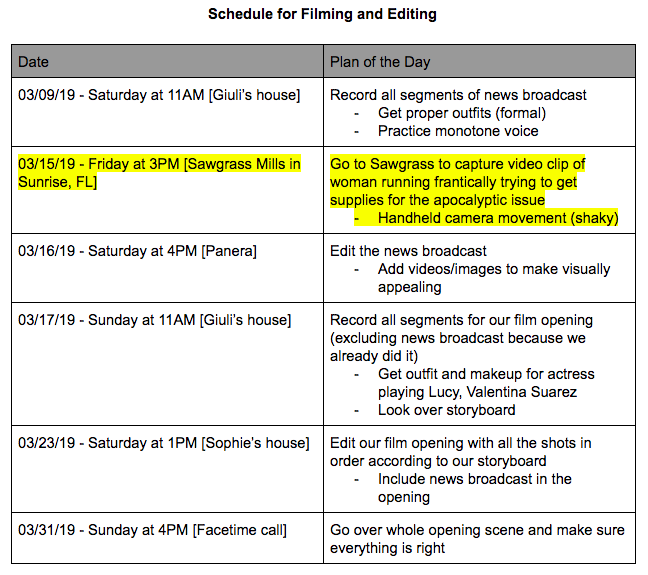
New Addition to our Schedule
The new addition to our schedule is the highlighted portion of the schedule. Again, we decided to film this video clip on a Friday because of the fact that Sawgrass mills is generally full on the weekend; therefore, we could get the best video clip, consisting of many individuals, to portray the chaotic atmosphere. The detailed explanation of what we would be doing to capture this video clip is located in the blog post titled, “Further Development for our New Broadcast”.
Storyboard for our News Broadcast
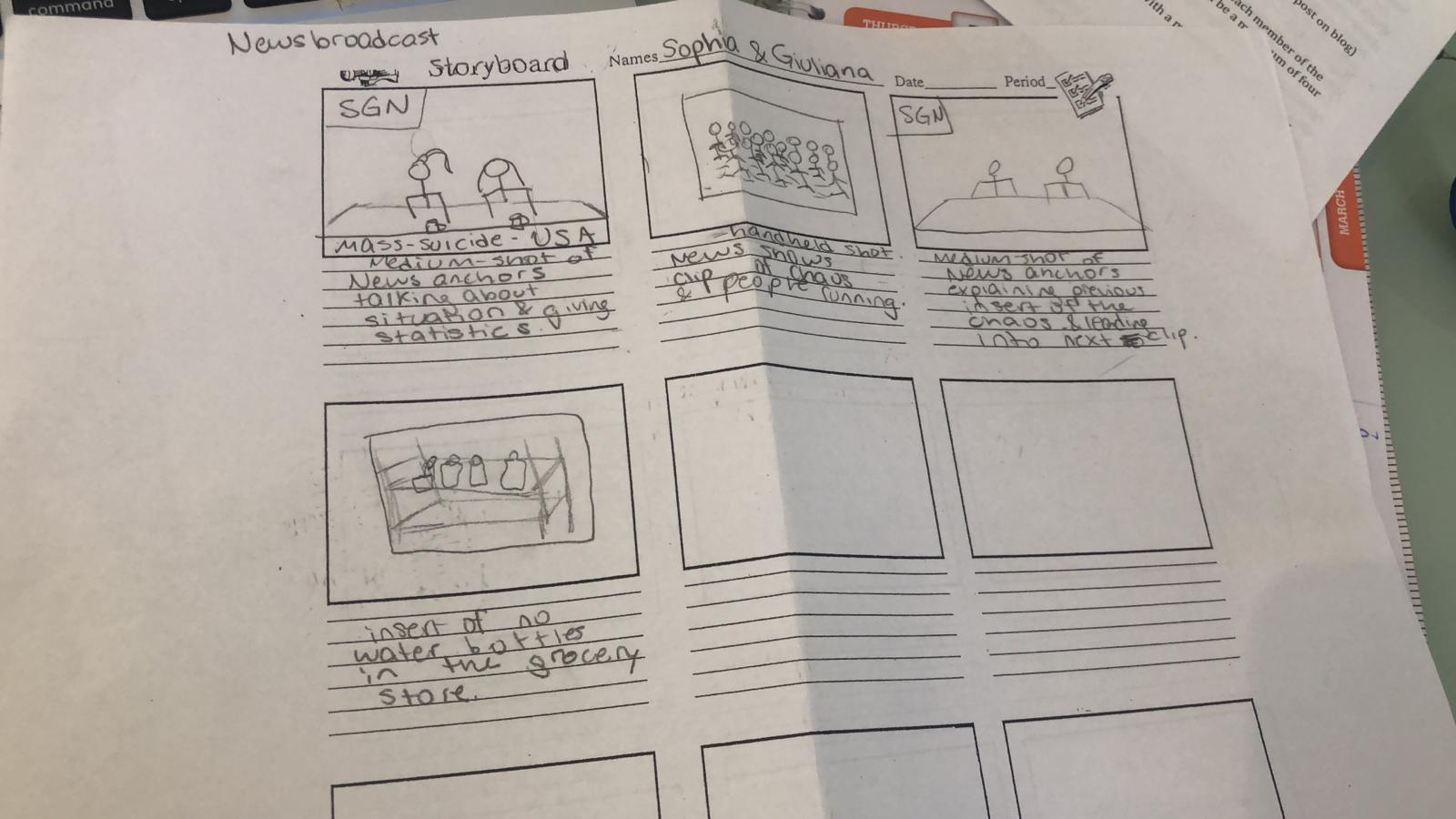
Located below is the storyboard for the news broadcast that will be included in our film opening. Here, one is able to take notice of the order in which we will be presenting the video clip of the woman running through the mall and image of the empty grocery isles. This storyboard is still up for change just in case we run into problems when editing/filming. Thus, any changes will be noted in a future post.
Designing Scene for New Broadcast (News Anchors Scene)
In order to design the scene of when the news anchors, which will be me and my partner, speak about the main conflict occurring during our film opening, we went online to find inspiration for our desired set up.
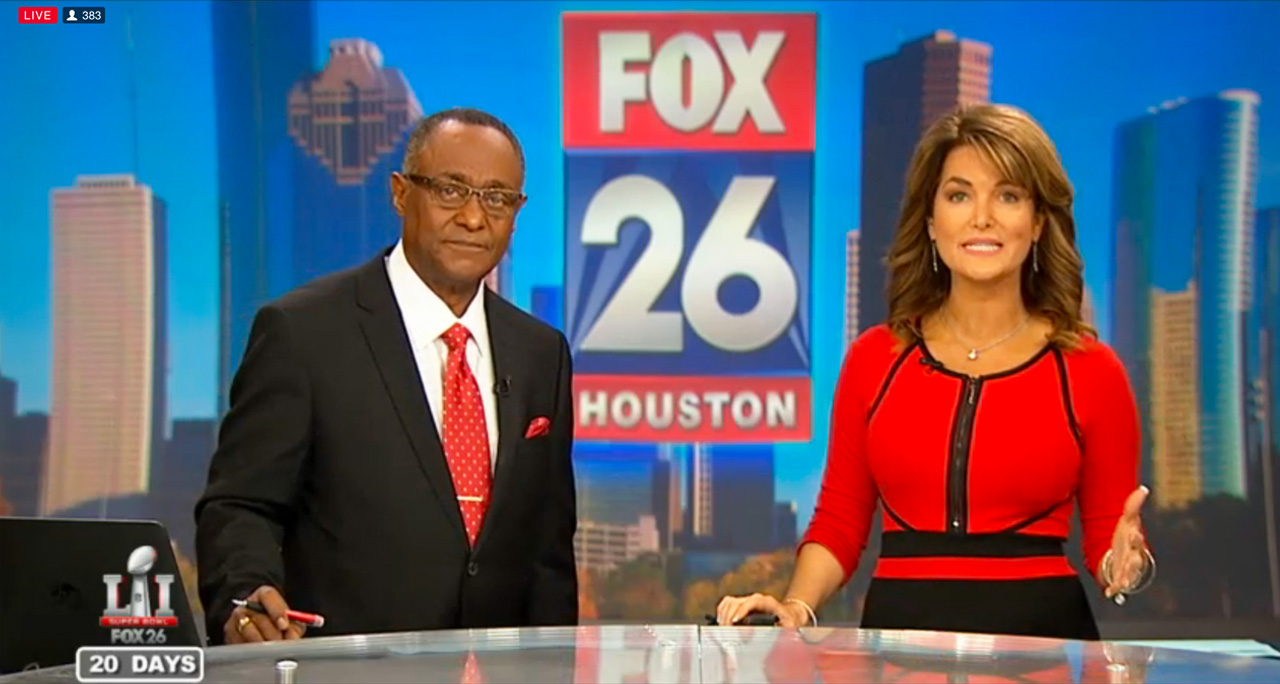
My partner and I were able to find the image above while searching for a good set up that we could realistically manage to achieve. So, we decided that the image above was the perfect inspiration for us, and basically what we are going to do is get a desk/ table to be the bottom portion of the image and find a way to replicate the background using our own logo, of course. In order to replicate the background, I have an idea that I think could work. So, the first part of this idea is designing our logo on a either Piktochart or Canva (This logo will be revealed in a later post). Then, we would set up the desk for our scene in front of a neutral colored wall, and we would essentially be utilizing a projector (which I can get from a family friend) to display our logo on the wall behind us. Thus, this would create a professional atmosphere and help me and my partner capture the look of a real news broadcast to insert in our film opening.
My partner and I were able to find the image above while searching for a good set up that we could realistically manage to achieve. So, we decided that the image above was the perfect inspiration for us, and basically what we are going to do is get a desk/ table to be the bottom portion of the image and find a way to replicate the background using our own logo, of course. In order to replicate the background, I have an idea that I think could work. So, the first part of this idea is designing our logo on a either Piktochart or Canva (This logo will be revealed in a later post). Then, we would set up the desk for our scene in front of a neutral colored wall, and we would essentially be utilizing a projector (which I can get from a family friend) to display our logo on the wall behind us. Thus, this would create a professional atmosphere and help me and my partner capture the look of a real news broadcast to insert in our film opening.
As for the lighting of this portion for the news broadcast, we plan on using the three point lighting technique. Specifically, we plan on using lighting as can be seen in the image below, with key lighting directly in front of the news anchors (me and my partner), fill lighting coming from the sides focusing on us, and back lighting coming from directly behind us.

Finally, my partner and I must consider the physical appearance for the news anchors. One element of this is the outfits, which must be business-like and serious. Thus, my outfit will be a black, fitted blazer with a white undershirt and straight-leg trouser pants. My outfit will also be complemented by certain accessories to contribute to the formal, elegant look. Thus, these accessories consist of the following: glasses, earrings, a necklace, a watch, and silver bracelets.
As for the makeup and hair, my partner and I plan on doing a slicked-back ponytail in each of our hair and neutral makeup (with one of us in a red lipstick) to contribute to the formal look of the news broadcast.
Finally, my partner and I must consider the physical appearance for the news anchors. One element of this is the outfits, which must be business-like and serious. Thus, my outfit will be a black, fitted blazer with a white undershirt and straight-leg trouser pants. My outfit will also be complemented by certain accessories to contribute to the formal, elegant look. Thus, these accessories consist of the following: glasses, earrings, a necklace, a watch, and silver bracelets.
As for the makeup and hair, my partner and I plan on doing a slicked-back ponytail in each of our hair and neutral makeup (with one of us in a red lipstick) to contribute to the formal look of the news broadcast.
Subscribe to:
Posts (Atom)